Wavefolder effect
The Faust (Functional Audio Stream) code shown below implements this distortion known as a Wavefolder. Wavefolding works by "folding" (essentially reflecting) a waveform back on itself when it exceeds a certain threshold, rather than clipping it flat like a standard distortion effect. The effect is a highly distorted, yet rich in harmonics, and texturally interesting sound often used in the “West Coast" synthesis.
// Import the standard Faust libraries, which provide access to basic math
// and signal processing functions.
import("stdfaust.lib");

// --- Wavefolder effect ---
// First folding stage (equivalent to the +/- 1.0 logic)
fold1(x) = ba.if(x > 1.0, 2.0 - x, ba.if(x < -1.0, -2.0 - x, x));

// Second folding stage (equivalent to the +/- 0.5 logic)
fold2(x) = ba.if(x > 0.5, 1.0 - x, ba.if(x < -0.5, -1.0 - x, x));

// --- Wavefolder ---
// gain: multiplier for the input signal
wavefolder(gain) = *(gain) : fold1 : fold2;

// Main processing loop with a UI slider
process = wavefolder(hslider("Wavefolder Gain", 1, 1, 20, 0.01));
Visualizing the Process
To better understand how this works in practice, examine the figure below which illustrates a sine wave being processed through the folding algorithm with dynamically increasing gain:
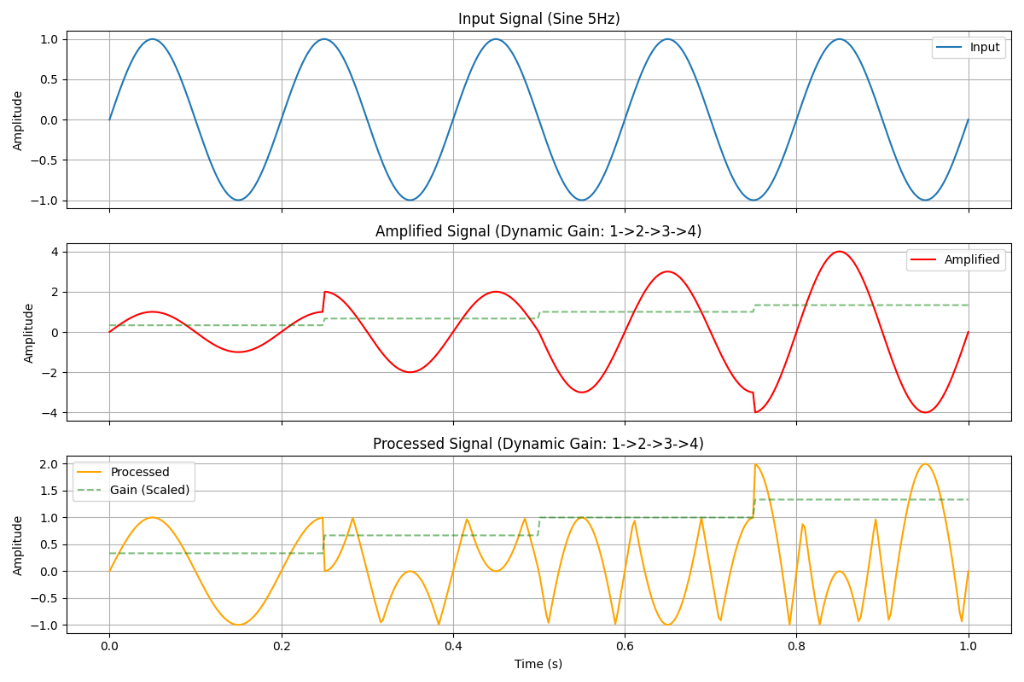
- Input Signal (Top): A clean \(5\text{Hz}\) sine wave with a steady amplitude oscillating between \(-1.0\) and \(1.0\).
- Amplified Signal (Middle): A dynamic gain (dashed green line) is applied to the input, sequentially stepping from \(1\times\) to \(2\times\), \(3\times\), and finally \(4\times\). The red line shows what the signal would look like if it were amplified without any folding logic applied.
- Processed Signal (Bottom): This represents the final output of the combined
fold1andfold2stages. As the gain increases and pushes the signal past the folding boundaries (\(\pm1.0\) and \(\pm0.5\)), the waveform "folds" inward instead of clipping. Notice that at higher gain multipliers, the signal folds more times and deeper, transforming a simple low-frequency sine wave into a highly complex, harmonically dense waveform.
What does wavefolding do?
This is the outer limit folder:
* Logic: If the signal goes above 1.0, it is reflected back down (\(2 - x\)). If it goes below \(-1.0\), it is reflected back up (\(-2 - x\)). * Result: It confines the signal roughly within a \( +/- 1.0 \) range by folding peaks.This is a tighter, inner folder:
- Logic: It performs a similar folding operation but with a threshold of \(0.5\). - Result: This adds a second layer of complex harmonic folding for signals that are within the \( +/- 1.0 \) range but exceeding \( +/- 0.5 \).How this works
In fold1 the constant \(2.0\) comes from the math required to mirror the signal around the threshold of \(1.0\). When a signal goes above the threshold (\(1.0\)), we want to reflect it back down by the exact amount it went over. Here is the formula derivation:
- Calculate the Overshoot: The amount the signal (\(x\)) exceeded the threshold (\(1.0\)) is \((x - 1.0)\).
- Subtract Overshoot from Threshold: To fold it back, we subtract that overshoot from the boundary line. \(Result = 1.0 - (x - 1.0)\)
- Simplify: \(Result = 1.0 - x + 1.0\) \(Result = 2.0 - x\)
So, \(2.0\) is effectively \(2 \times \text{threshold}\).
The same pattern repeats in fold2. The threshold there is \(0.5\), so the constant used is \(1.0\), which is \(2 \times 0.5\).
The "Wavefolder" Algorithm
The main process chains the processing steps together using the pipe operator (:):
Sequence:
- Input Gain: The input signal is multiplied by gain. The louder the signal is pushed in, the more it will hit the folding thresholds.
- Fold 1: Passes through the \(+/- 1.0\) folder.
- Fold 2: Passes through the \(+/- 0.5\) folder.
Main Process:
Creates a UI slider named "Wavefolder Gain" allowing the user to control the drive from \(1.0\) to \(20.0\).